
Email Extractor
Got a long email thread, a spreadsheet export or a web page with addresses scattered through it? Paste the text or open the file and the extractor finds every email address, removes duplicates, and lets you filter by domain, drop no-reply addresses and choose the separator. Copy the clean list or download it as a CSV — nothing leaves your device.
- Free to use
- No sign-up
- Runs in your browser
Email address extractor
Email List Hygiene Kit
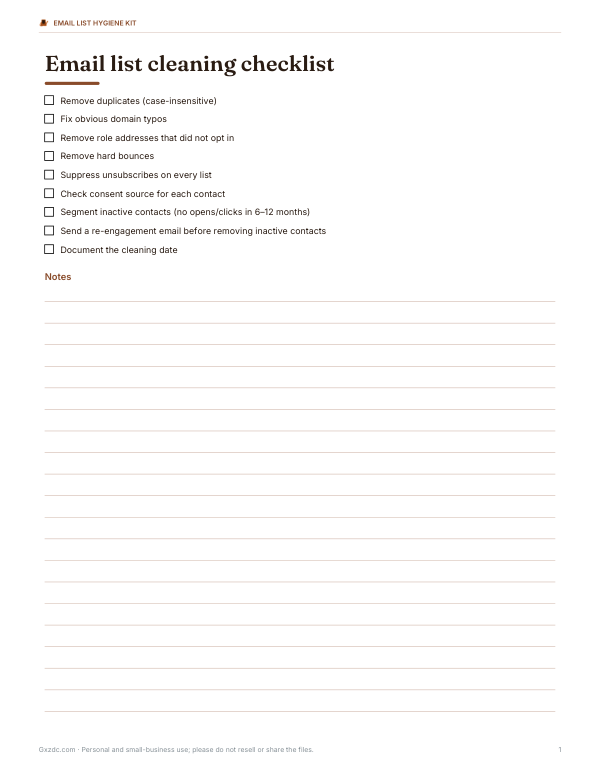
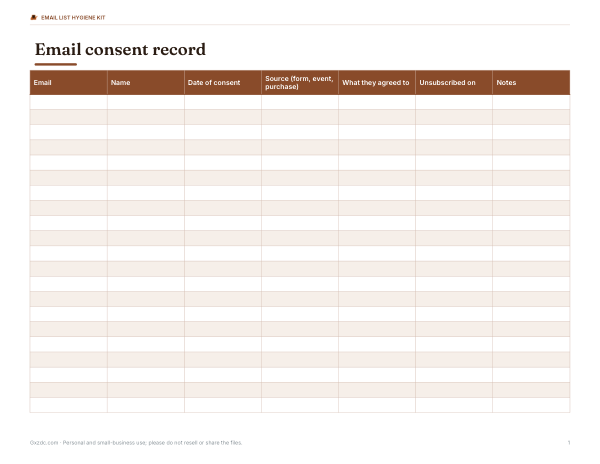
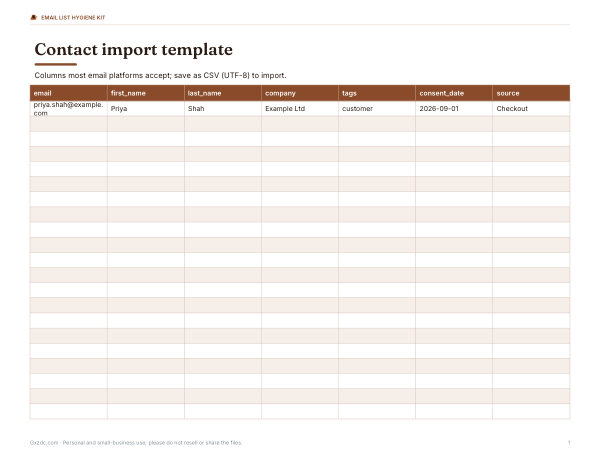
Email list cleaning checklist, consent record log, CSV import templates for common email platforms, a typo domain reference and a list-maintenance schedule.
- Cleaning checklist (PDF/DOCX)
- Consent log (XLSX)
- Import template (XLSX/CSV)
- Typo reference (PDF)
Formats: PDF, DOCX, XLSX. Instant download after payment (link valid 72 hours, up to 5 downloads). AI-assisted: the templates were drafted with AI help and reviewed and laid out before publishing.
$5.00 USD, one-time 4 files · about $1.25 each
- Instant download
- 7-day refund
- Secure checkout by Stripe
7-day money-back guarantee. Full refund within 7 days of purchase, even after you download.
Free sample: Common Domain Typos (PDF, 61 KB)
Full refund within 7 days — see the refund policy and license.
Free printables
Single sheets you can print right now, no sign-up. The full pack adds every sheet in one download plus the editable files.
 Printable Email Domain Typo Reference
What the extractor does
It scans any text for patterns that look like email addresses — a local part, an @ sign and a domain with a dot — and lists every match. You can paste text directly or open a file: plain text, CSV exports from spreadsheets or CRMs, saved HTML pages, contact cards (VCF) or saved email messages (EML). The results can be cleaned up in one pass: converted to lower case, deduplicated, sorted, filtered by domain and joined with the separator your email program or spreadsheet expects.
How to use it
- Paste text into the box, or choose a file to load it.
- Choose options: lower-case, remove duplicates, sort, and drop no-reply addresses.
- Filter by domain if you only want addresses from, for example, your company domain, or exclude domains you don’t need.
- Pick the separator: new lines for spreadsheets, commas for most email programs, semicolons for Outlook.
- Copy the list or download a CSV with each address and its domain.
Common uses
| Situation | How the extractor helps |
|---|---|
| Long email thread | Collect everyone who was copied to set up a meeting invite |
| Messy spreadsheet export | Pull addresses out of notes columns and merged cells |
| Event sign-up form responses | Build a clean attendee list without duplicates |
| Old contact cards (VCF) | Get a plain list of addresses to import elsewhere |
| Website audit | Find every address published on your own site to check for outdated contacts |
| Support inbox export | List customers who wrote in about a specific issue to follow up |
Responsible use
Only collect and use email addresses you have a right to use. Sending marketing email to people who have not agreed to receive it breaks anti-spam and privacy laws in many places — including CAN-SPAM in the United States, CASL in Canada, and GDPR and PECR in the UK and EU — and damages your sender reputation. Do not scrape addresses from other people’s websites for bulk mailing. The tool is intended for organising contacts you already hold, such as colleagues, customers who contacted you, or attendees who registered with you.
Why some addresses are missed or included
- Addresses hidden in images or behind JavaScript on a website are not in the text, so they can’t be found.
- Obfuscated addresses such as “name [at] domain [dot] com” are only found when you tick the option.
- Strings that look like addresses but aren’t — such as image file names like logo@2x.png — can occasionally match; review the list.
- Very unusual but valid addresses (quoted local parts, IP-address domains) are rare and not matched.
- Encoded addresses in HTML (for example using character entities) may need to be decoded first by opening the page and copying its text.
Worked example
The sample text contains six addresses, one of them twice in different capitals and one written as “sales [at] widgets [dot] io”. With lower-case and duplicate removal on, the extractor lists five unique addresses from three domains. Ticking “Find name [at] domain [dot] com” adds sales@widgets.io, and ticking “Drop no-reply addresses” removes noreply@mailer.example.org. Choosing the semicolon separator gives a list ready to paste into an Outlook To field.
Separators for popular programs
| Program | Paste addresses separated by |
|---|---|
| Outlook (desktop and web) | Semicolons |
| Gmail | Commas |
| Apple Mail | Commas |
| Spreadsheets (one per row) | New lines |
| Most newsletter platforms (import) | CSV file with an email column |
Extracting from a website you manage
To audit the addresses published on your own website, open the page, select all text (Ctrl+A or Cmd+A), copy and paste it here. For a whole site, save pages as HTML and open them one at a time. Addresses inside images or contact forms won’t appear. This is a quick way to find outdated staff addresses before they attract spam or confuse customers.
Duplicates and capital letters
The part of an address after the @ is never case-sensitive, and in practice almost every email provider treats the part before it as case-insensitive too, so Tom@Example.com and tom@example.com reach the same inbox. That is why the extractor removes duplicates without regard to case and offers to lower-case everything. Some providers also ignore dots or “+tags” in the local part (for example, gmail treats j.smith and jsmith as the same), but the tool keeps those as separate addresses because other providers do not.
Cleaning your list further
Extraction finds addresses; it can’t tell whether they still work. Before a large mailing, remove role addresses that shouldn’t receive newsletters, check for obvious typos (gmial.com, hotmial.com), and use your email platform’s bounce handling. Keep a record of how and when each person agreed to hear from you.
Privacy
The extractor runs entirely in your browser. Text and files you open are not uploaded, stored or logged; closing the page clears them.
Frequently asked questions
How do I extract email addresses from text?
Paste the text into the box; every address is listed below, ready to copy.
Can it read CSV or HTML files?
Yes, open TXT, CSV, HTML, VCF or EML files.
Does it remove duplicates?
Yes, with the Remove duplicates option (case-insensitive).
Which separator does Outlook use?
Semicolons between addresses.
Is my data uploaded?
No, everything is processed in your browser.
Can I use extracted addresses for marketing?
Only with the people’s consent and in line with anti-spam laws.